
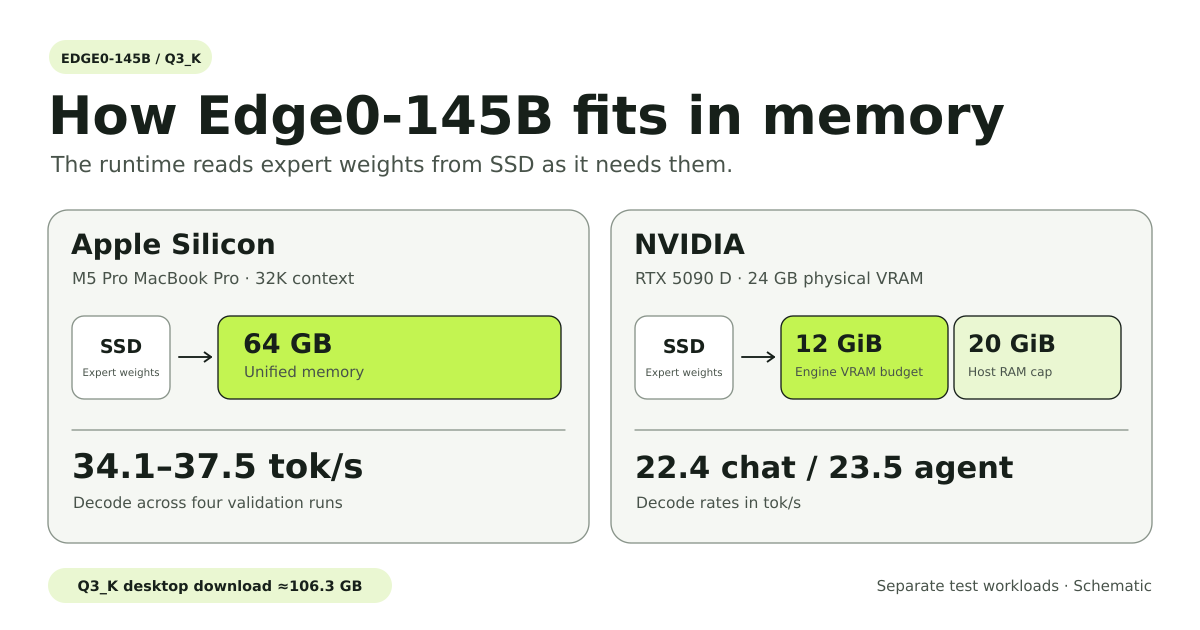
Edge0-145B ran at 34.1–37.5 tokens per second on a 64 GB MacBook Pro with M5 Pro in Edge0’s validation for v0.3.1. The test used the Q3_K build at a 32K context. On NVIDIA, Edge0 also tested Q3_K at 22.4 tok/s in chat and 23.5 tok/s in agent decode with a 12 GiB engine VRAM budget and a separate 20 GiB host RAM cap. That run used a 24 GB RTX 5090 D configured to leave half its VRAM outside the engine budget. Mac validation · NVIDIA model-card results
The Edge0-145B memory requirements depend on where the engine can keep frequently used weights and how quickly it can fetch the rest. On a Mac, the CPU and GPU share one pool of unified memory. On a discrete NVIDIA system, GPU memory and system RAM are separate tiers. Both setups can use the SSD to hold experts that the engine reads on demand. A full desktop download listed for Q3_K still takes about 106.3 GB of storage. Edge0 model catalog · Deployment reference
Edge0-145B memory requirements by platform
| Setup | Memory or hardware condition | Published result |
|---|---|---|
| MacBook Pro M5 Pro, Q3_K, Metal | 64 GB unified memory, 32K context. Engineering validation for v0.3.1. | 34.1–37.5 tok/s decode across four generation runs. |
| RTX 5090 D 24 GB, Q3_K, constrained | 16 GiB engine VRAM budget and a separate 20 GiB host cap. | 36.8 tok/s chat, 44.9 tok/s agent. |
| Same RTX 5090 D, Q3_K, tighter limits | 12 GiB engine VRAM budget and the same 20 GiB host cap. SSD streaming and a smaller prefill configuration. | 22.4 tok/s chat, 23.5 tok/s agent. |
| RTX 5090 D 24 GB, published headline rows | Same GPU model, full-card benchmark configurations. | Q3_K 99.7 chat / 121.2 agent tok/s. NVFP4 79.6 chat / 98.3 agent tok/s. |
The Mac validation used its own prompts and output lengths. The NVIDIA table uses Edge0’s chat- and agent-decode workloads. Compare configurations within the same test protocol when you want to estimate how a hardware or engine change will affect your work. Mac test details · NVIDIA speed table
What changed for Apple Silicon
The v0.3.1 release added on-demand expert reads for both Q3_K and NVFP4 on Metal. The engine sizes an area of memory for expert weights according to what the Mac can spare. During inference, it reads the experts it needs from the SSD into that area. The model folder stays on disk, and the runtime can keep running without making the entire expert pool resident at once. The packaged app requires Apple Silicon and macOS 26 or later. v0.3.1 release notes · Implementation and validation
The physical 64 GB test helps put the decode number in context. In earlier validation for the same release, three 512-token outputs measured 34.1, 36.6, and 36.6 tok/s. A 2,048-token output reached 37.5 tok/s. In separate retrieval checks on the same M5 Pro, the time to first token was 7.7 seconds with a 3,432-token prompt, 24.2 seconds with 13,632 tokens, and 53.0 seconds with 30,635 tokens. If your coding workflow sends long prompts, the opening wait can matter as much as the pace of the reply. Validation run details
Edge0 also measured a separate process-memory figure on a 192 GB M2 Ultra Mac Studio. Its engineers wired down 128 GiB and used the 64 GB streaming budget to emulate the smaller available-memory environment. The recorded peak was about 38.3 GB of process physical footprint against a 41.2 GB test cap. That figure describes the engine’s footprint in that test. The physical MacBook Pro result comes from its own 64 GB hardware configuration. Validation and memory pressure notes
What the November 20–21 Metal changes measured
Source changes merged after the v0.3.1 package build make the timing of a memory reading especially important. In a Q3_K test on a 64 GB M4 Max MacBook Pro, the measured engine footprint after the benchmark went from 13.2 GB to 8.7 GB when idle prompt buffers became reclaimable by macOS. That is a post-benchmark snapshot. A separate test on the same hardware hit Metal allocation errors at larger prompt chunk sizes, leading to a 2,048-row cap for latent models on Macs below 96 GB. Buffer change and measured footprints · Prompt chunk limit and failed configurations
This is why an engine footprint below 18 GB tells you little about whether the complete workload fits on a Mac with 18 GB of unified memory. The M4 Max test had a 64 GB shared pool available while the engine processed prompts and accessed weights on disk. Use the physical device, memory pressure during the request, and the engine version together when reporting a result.
What the 12 GiB NVIDIA test actually measured
The current edge0-infer documentation lists 16 GiB GPU memory and 20 GiB system memory for NVIDIA deployments on Linux or Windows with CUDA 13. The model card’s 12 GiB row is a tuned experiment with Q3_K. It reserved 12,288 MiB on a 24 GB RTX 5090 D, capped host memory using a cgroup, and disabled swap. Edge0 estimates that a physical 12 GiB card leaving 700 MiB free for the driver and desktop gives the engine about 11.3 GiB. The card’s other hardware limits will also affect throughput. Runtime requirements · Small-card configuration
The settings explain why the low-VRAM run is useful and why it behaves differently:
- The host expert cache ended up at about 14 GiB under the 20 GiB host cap. Experts outside the GPU and host caches could be read from the SSD.
- The run used Q8 dense projections, 512-token prefill chunks, and suffix-based speculative decoding. It omitted the multi-token prediction draft head to free accelerator memory.
- At 16K input, the full-card Q3_K row reached 3,554.9 tok/s prefill. The 16 GiB and 12 GiB configurations reported 335 and 222 tok/s. The rows document the performance of complete configurations, including their different settings. Measurement conditions
Expert residency is another useful data point. With residency enabled, Edge0 reported 23.14 GiB of VRAM and 31.28 GiB of host RAM for Q3_K on the RTX 5090 D. The corresponding NVFP4 figures were 23.25 GiB and 38.27 GiB. The GPU and host expert caches hold different sets of experts in this mode. These residency figures describe a specific configuration and belong alongside the card’s separate constrained-budget results. Residency comparison
Why a 145B model can run with this much memory
Edge0-145B uses a mixture of experts. At each layer, the router selects 10 of 512 routed experts for the current token, and a shared expert runs alongside them. The complete pool must be available because the routing decision can change on the next token. The engine uses a profile to decide which experts to keep close at hand. Model architecture · Runtime model files
Edge0 also reduces the size of each routed expert. A shared down projection maps a 2,560-wide representation to 1,792 before the experts operate on it. An up projection returns their result to the model’s full width. Narrower experts require fewer weights, and quantization reduces the bytes needed to store each weight. The routed expert file is 37.32 GiB in Q3_K and 44.30 GiB in NVFP4. The difference matters every time an expert has to move from a slower tier. Architecture and tensor formats
The embedding table has a different access pattern. Edge0 stores its FP8 per-layer n-gram embeddings in ple-fp8.gguf, a file of about 51.2 GB. In direct-read mode, the engine reads the needed entries from disk. The remaining memory budget also has to cover the key-value cache, which stores information about earlier tokens. The current launch defaults are 131,072 tokens on NVIDIA and 32,768 on macOS. Use your actual context setting when budgeting for a local coding session. Model files · Runtime options
How much SSD space should you reserve?
Use the desktop catalog’s download totals. It lists 106.3 GB for Q3_K and 113.8 GB for NVFP4, rounded in decimal GB. These totals describe the files the app lists for download, including the expert pack, embedding table, skeleton, and supporting assets. The card’s 40.81 GiB and 47.79 GiB build figures match the expert file plus the Q8 projection file in each download. On macOS, the model directory also needs to be writable so the runtime can generate its draft-layer file on first start. Desktop download catalog · Q3_K files · NVFP4 files · Metal first-start requirements
What to check on your own machine
Use the nearest published test as your starting point. On a 64 GB Apple Silicon Mac, the M5 Pro Q3_K run gives you a reference for a 32K session. On NVIDIA, record the physical card, VRAM budget, and available host RAM separately. The low-memory model-card procedure includes additional tuning, so check the current launch guide for which settings your entry point reads. Mac release · NVIDIA launch and tuning options
After loading the model, run a short prompt and then a prompt close to the size you use at work. Record first-token delay, decode speed, swap activity, and the configured context. For an agent, run a complete task with the history and tool results you normally send. A short decode benchmark measures how quickly the runtime can generate. The full task tells you whether the Edge0-145B memory requirements and speed fit your workflow. Edge0-145B deployment guide
Frequently asked questions
What does Edge0 recommend for an NVIDIA setup?
The current runtime documentation lists at least 16 GiB of GPU memory and 20 GiB of system memory for the Linux or Windows CUDA path. A separate Q3_K experiment tightened the limits to 12 GiB of engine VRAM and 20 GiB of host RAM on a 24 GB RTX 5090 D. Runtime requirements · Constrained tests
Which 64 GB Mac was benchmarked?
Edge0 measured Q3_K on a 64 GB MacBook Pro with M5 Pro at a 32K context. The test reported 34.1–37.5 tokens per second across four generation runs. Mac validation
How much disk space do the two 145B builds need?
Edge0's desktop catalog lists downloads of about 106.3 GB for Q3_K and 113.8 GB for NVFP4. The download includes the expert pack, embedding table, skeleton, and supporting assets. Desktop catalog